
IQ summaries
IQ summaries appear as a summary bar at the top of multiple pages in Vantage, providing a quick overview of Vantage IQ insights relevant to that page.
IQ summaries and Insights are both computed using internal models that communicate only within your Vantage instance. An additional model specializes and reprocesses the insights for the context of each page. The summary bar appears at the top of multiple pages and summarizes the Vantage IQ data relevant to that page, helping you quickly recognize problems.

When the icon is animated, Vantage IQ is still processing the insights. Updates only take a few seconds.
If you select an insight in the summary bar, Vantage applies the applicable filter and the page or table updates. If you then make changes to the page, such as applying table filters, the summary bar becomes blurred to show it no longer applies. To restore the original filtered view, select Restore filters and the page resets. If you select Dismiss, the original insights view appears again.
Select See more... to open the summary drawer.
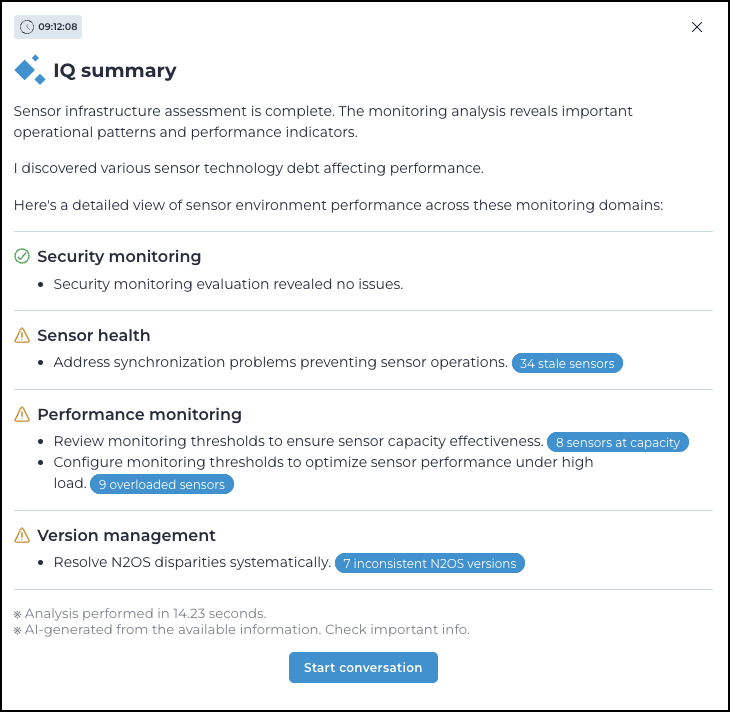
If you then select one of the blue buttons, the related table opens with the applicable filter active.