Retention

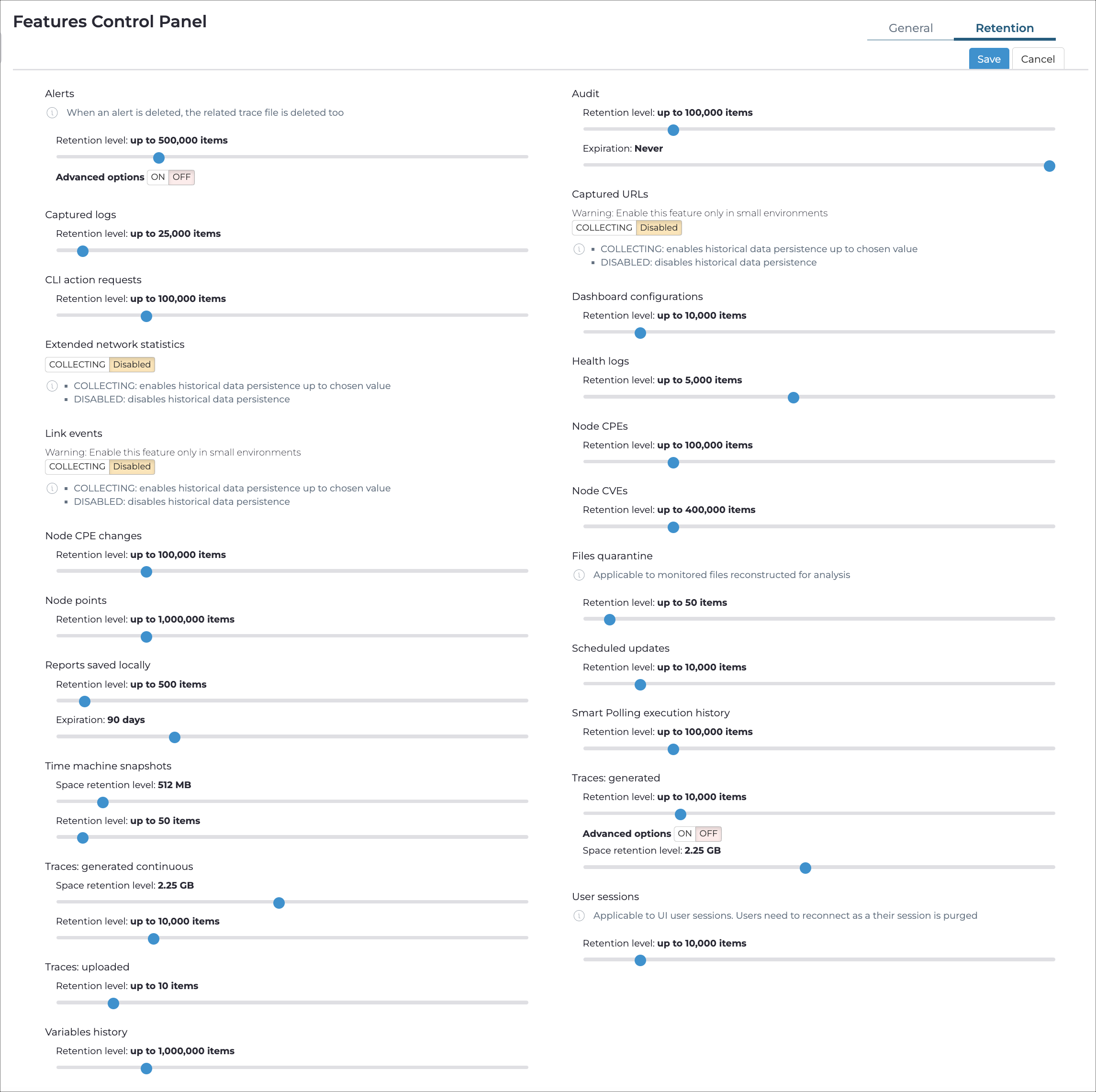
The Retention tab lets you configure how much historical data Guardian stores for each data category.

Figure 1. Retention tab

The Retention tab of the Features page, showing data category cards with retention sliders

The Retention tab displays a set of data category cards in a two-column layout. Each card shows one or more sliders you can adjust to control how much data Guardian stores. Some categories also have a COLLECTING / DISABLED toggle, and some offer Advanced options that let you set per-subcategory limits within the overall total.

Expiration

Sets the maximum age of stored items in days. When an item exceeds this age, the system deletes it. Set to Never to keep items indefinitely.

Retention level

Sets the maximum number of items to store. When the limit is reached, the system deletes the oldest items to make room for new ones.

Space retention level

Sets the maximum disk space to use for storing items. When the limit is reached, the system deletes the oldest items.

Discard rate

Sets the maximum rate of incoming items per minute. The system discards new items when they exceed this threshold.

Data categories

The following data categories appear on the Retention tab. Categories that require optional features only appear when you have licensed and enabled those features on this sensor.

Data category Controls Notes
Left column (top to bottom)
Alerts Retention level Deleting an alert also deletes the related trace file. Advanced options let you set a separate sub-limit for alerts outside the active security profile.
Captured logs Retention level
CLI action requests Retention level
Extended network statistics Space retention level Can be toggled on or off.
Link events Retention level, Discard rate Can be toggled on or off. Enable only in small environments.
Node CPE changes Retention level
Node points Retention level
Reports saved locally Retention level, Expiration
Arc support archives Retention level, Expiration
Smart Polling execution history Retention level
Traces: generated Retention level, Space retention level Advanced options let you set sub-limits for traces generated by high risk alerts, medium risk alerts, low risk alerts, and by user request. The space retention level control is not available on systems where traces use tmpfs-based storage.
User sessions Retention level Applies to UI user sessions only. Users must reconnect when their session is purged.
Right column (top to bottom)
Audit Retention level, Expiration
Captured URLs Retention level, Discard rate Can be toggled on or off. Enable only in small environments.
Dashboard configurations Retention level
Health logs Retention level
Node CPEs Retention level
Node CVEs Retention level Requires Vulnerability Assessment.
Files quarantine Retention level Applies to monitored files reconstructed for analysis.
Scheduled updates Retention level
Time machine snapshots Space retention level, Retention level
Traces: generated continuous Space retention level, Retention level
Traces: uploaded Retention level
Variables history Retention level