Jump to main content
Nozomi Networks Technical Documentation
  • Vantage
  • CMC
  • Arc
  • Guardian Air
  • Guardian
  • Remote Collector
  • Threat Intelligence
  • Asset Intelligence
  • Hardware
  1. Home
  2. Guardian

    Learn how Guardian provides comprehensive asset inventory and network visibility for OT and IoT environments.

  3. Administrator Guide

    Information and resources about the Administration section of Guardian, and the tasks that you can do in this part of the software.

  4. Administration
  5. Settings
  6. Security control panel

    The Security control panel page shows an overview of the current status of the learning process and lets you configure the features that manage the: learning, security profile, zones, alerts tuning, and alert closing options.

  7. Overview

    The Overview page shows an overview of the learning status, security profile chosen, zone configurations, and alert tuning rules configured.
  • Guardian

    Learn how Guardian provides comprehensive asset inventory and network visibility for OT and IoT environments.

    • Introduction

      An overview of Guardian.

    • Installation Guide

      Information and resources on how to install Guardian, and the different options and settings that are available.

    • Administrator Guide

      Information and resources about the Administration section of Guardian, and the tasks that you can do in this part of the software.

      • Administration
        • Administration page

          The administration page lets a user with administrator privileges configure settings and do other tasks.

        • Settings
          • Security control panel

            The Security control panel page shows an overview of the current status of the learning process and lets you configure the features that manage the: learning, security profile, zones, alerts tuning, and alert closing options.

            • Overview

              The Overview page shows an overview of the learning status, security profile chosen, zone configurations, and alert tuning rules configured.

            • Edit

              The Edit page lets you configure the security features through simple steps.

            • Manage network learning

              The Manage network learning page lets you review and manage the Network Learning status in detail.

          • Features

            The Features page shows an overview of the current status of system features configuration and lets you fine tune specific values.

          • Users management

            The Users management page shows all the pages that you need to let you manage authentication and authorization policies for users and groups.

          • CLI

            The CLI page lets you change configuration parameters and perform troubleshooting activities.

          • Dashboards

            The Dashboards page lets you create and configure widget-based dashboards that provide information about your network. The dashboards created here will show on the Guardian home page, and give an overview of the monitored environment.

          • Threat Intelligence

            The Threat Intelligence page lets you manage packet rules, YARA rules, Sigma rules, structured threat information expression (STIX) indicators and vulnerabilities to provide detailed threat information.

          • Custom fields

            The Custom fields page lets you create a custom field to the Nodes (All-In-One CMC only) and Assets tables. A custom field lets you add information that might be relevant to your organization, and cannot be extracted from network traffic.

          • Discovery

            Enables lightweight network announcements to detect neighboring devices. Use this option to initiate device discovery within the local network. Discovery is disabled by default.

          • Data integration
          • Firewall integration

            The Firewall integrations page shows all the firewall integrations and lets you add new ones.

          • Credentials manager

            The Credentials manager is a tool that lets you centralize the management of monitored endpoints to make it easier to create, delete, or update the credentials that are needed to access those endpoints.

          • Zone configurations

            The Zone configurations page shows all the zone configurations in your environment and lets you add new zone configurations and edit them.

          • Synchronization settings

            The Synchronization settings page lets you customize the parameters related to Vantage or Central Management Console (CMC).

          • Alert playbooks
        • System
    • User Guide

      Information and resources about the main features of Guardian, and the tasks that you can do from the user interface (UI).

    • Maintenance Guide

      Information about the maintenance tasks of Guardian, to help you administer and maintain the solution in a production environment.

    • Print format documentation

      A list of all the print-format documentation that is available for Guardian.

Overview

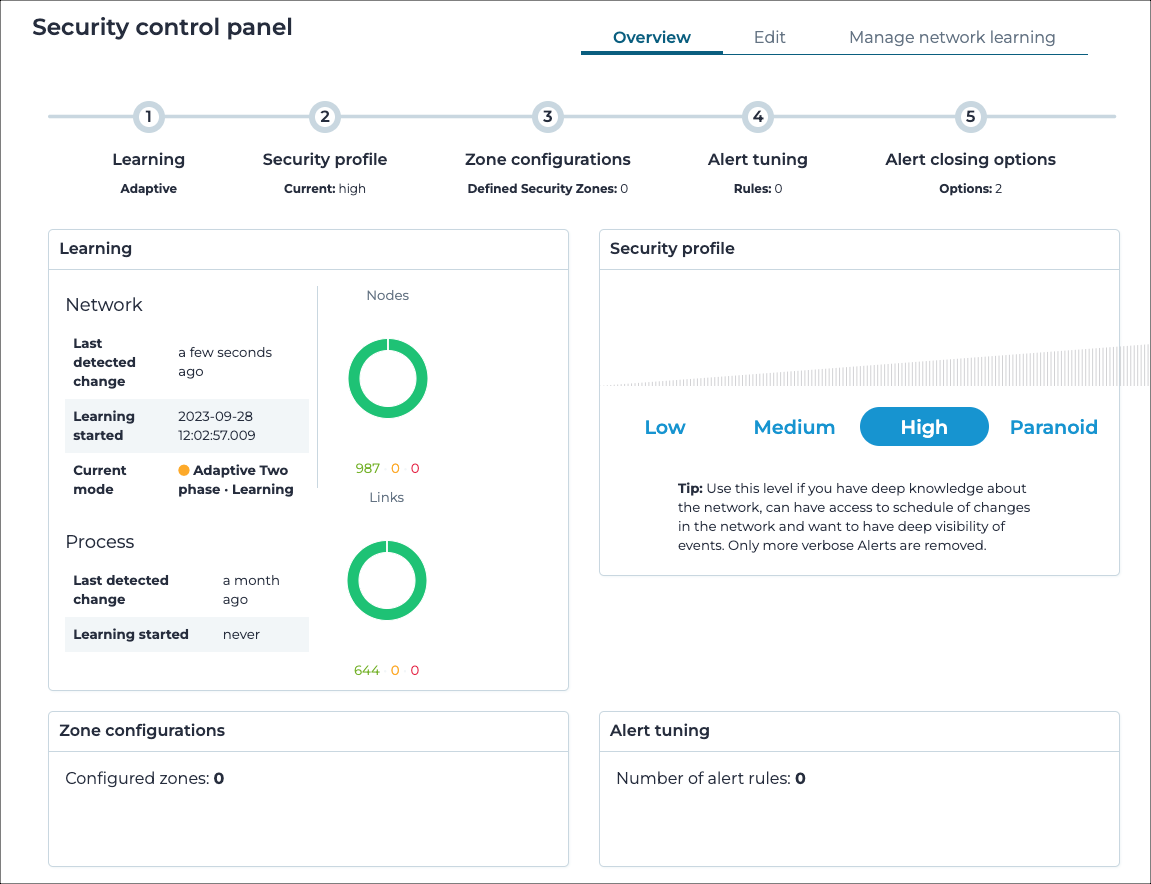
The Overview page shows an overview of the learning status, security profile chosen, zone configurations, and alert tuning rules configured.

Figure 1. Overview page

Overview page

The Overview page shows an overview for each of these pages:
  • Learning
  • Security profile
  • Zone configurations
  • Alert tuning
  • Alert closing options
Complete website

Copyright © 2013-, Nozomi Networks Inc.     |     Published: