Jump to main content
Nozomi Networks Technical Documentation
  • Vantage
  • CMC
  • Arc
  • Guardian Air
  • Guardian
  • Remote Collector
  • Threat Intelligence
  • Asset Intelligence
  • Hardware
  1. Home
  2. Arc

    Learn how Arc provides endpoint security in high availability environments.

  3. Arc
  4. Configuration

    Details on how to configure Arc.

  5. Local UI

    The default method to manage Arc is through the upstream Nozomi Networks product, which applies configurations to all Arc sensors in Service mode. However, it is also possible to manage Arc through a local UI for One-shot and Offline executions.

  6. This asset

    The This asset tab displays information about the host on which Arc is running, across several tabs.
  • Arc

    Learn how Arc provides endpoint security in high availability environments.

    • Arc
      • Introduction

        An overview of Arc.

      • Requirements

        The machine and network requirements necessary to use Arc.

      • Preparation

        Information on how to import Arc packages, and install a license.

      • Configuration

        Details on how to configure Arc.

        • Configure an Arc sensor in Guardian

          You can configure an individual Arc sensor in Guardian directly from the Sensors details page for the related sensor.

        • Configure an Arc sensor in Vantage

          You can configure an individual Arc sensor in Vantage directly from the Sensors details page for the related sensor. Arc sensors in Service mode use these settings.

        • Local UI

          The default method to manage Arc is through the upstream Nozomi Networks product, which applies configurations to all Arc sensors in Service mode. However, it is also possible to manage Arc through a local UI for One-shot and Offline executions.

          • Configuration

            The Configuration page lets you define upstream connection settings, execution options, protection preferences, and traffic monitoring parameters for the Arc sensor.

          • Status

            The Status section shows a list of all the required dependencies for the selected sensor, and the installation status for each dependency.

          • Latest run

            The Latest run section shows the status and mode of the latest run that was executed.

          • Asset inventory

            The Asset inventory section displays the status of Discovery and Smart Polling. These features provide visibility into networked devices and asset details.

          • Last 100 runs

            The Last 100 runs section shows the status of the last 100 runs.

          • Offline archives

            The Offline archives page shows a list of the offline archives created on the host.

          • This asset

            The This asset tab displays information about the host on which Arc is running, across several tabs.

            • Overview

              The Overview tab shows identity and system information about the host on which Arc is running.

            • Processes

              The Processes tab shows the list of active processes on the host that have open ports.

            • Users

              The Users tab shows the list of users on the host.

            • Hardware components

              The Hardware components tab shows the list of hardware devices connected to the host.

            • Software

              The Software tab shows the list of software installed on the host.

            • Hotfixes

              The Hotfixes tab shows the list of Windows hotfixes installed on the host.

            • USB devices

              The USB devices tab shows a tree-like presentation of the USB hardware devices connected to the host.

          • Open the local UI

            The local UI lets you manage Arc without the use of a parent system software. It gives you access to the Status page to monitor the status of Arc executions, and the Configuration page to configure Arc executions. You can double-click the executable file to open it, or use the command-line interface (CLI).

        • Shell commands

          A list of available shell commands.

      • Deployment

        Information on how to deploy Arc. This includes details for manual and automatic deployments, and deployment through a mobile device management (MDM) system.

      • Execution

        Information on the different modes that you can use with Arc.

      • Troubleshooting

        Troubleshooting procedures to help you solve problems that might occur when you use Arc.

    • Arc Embedded

      Arc Embedded is a cybersecurity sensor built into PLCs to provide real-time visibility and deep threat detection within industrial control systems.

    • Print format documentation

      A list of all the print-format documentation that is available for Arc and Arc Embedded.

This asset

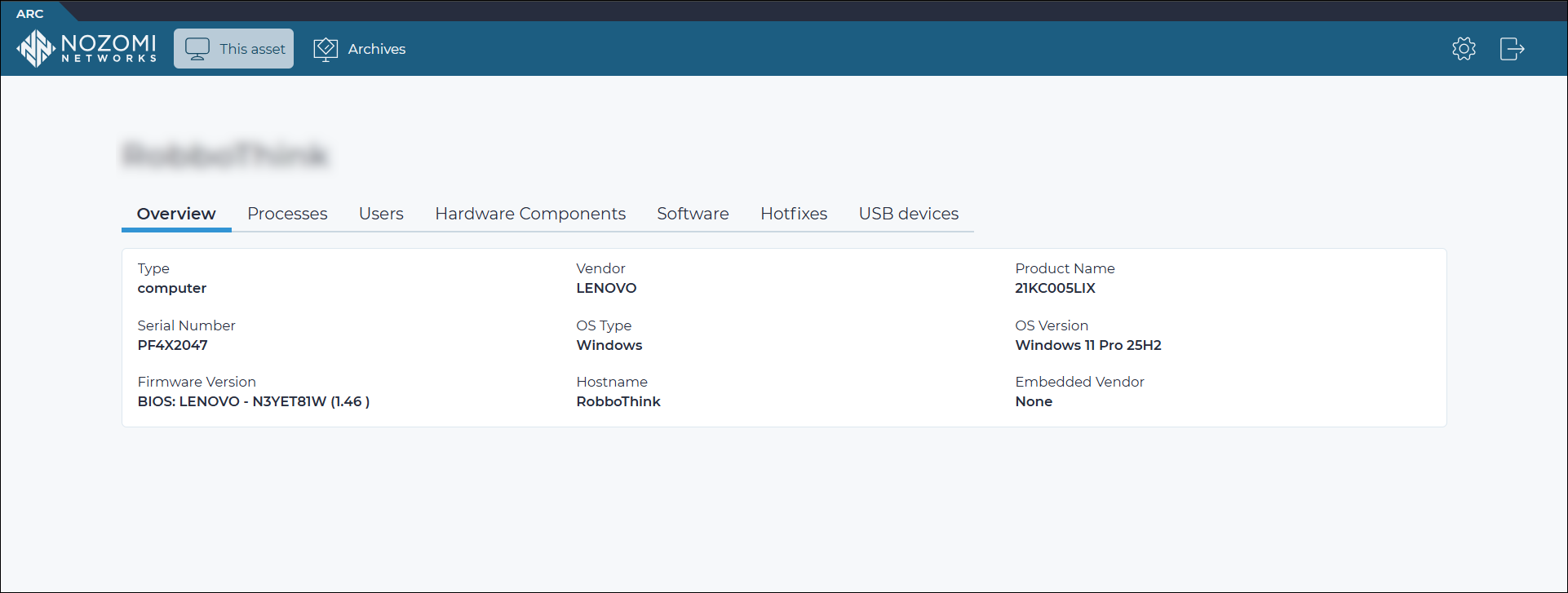
The This asset tab displays information about the host on which Arc is running, across several tabs.

Figure 1. This asset tab

This asset tab in the Arc local UI showing tabs for overview, processes, users, hardware components, software, hotfixes, and USB devices

The This asset tab provides the following tabs:

  • Overview
  • Processes
  • Users
  • Hardware components
  • Software
  • Hotfixes
  • USB devices
Related information
  • Local UI
    The default method to manage Arc is through the upstream Nozomi Networks product, which applies configurations to all Arc sensors in Service mode. However, it is also possible to manage Arc through a local UI for One-shot and Offline executions.
Complete website

Copyright © 2013-, Nozomi Networks Inc.     |     Published: