
Alerts
The Alerts page lists every alert that the sensor has generated.
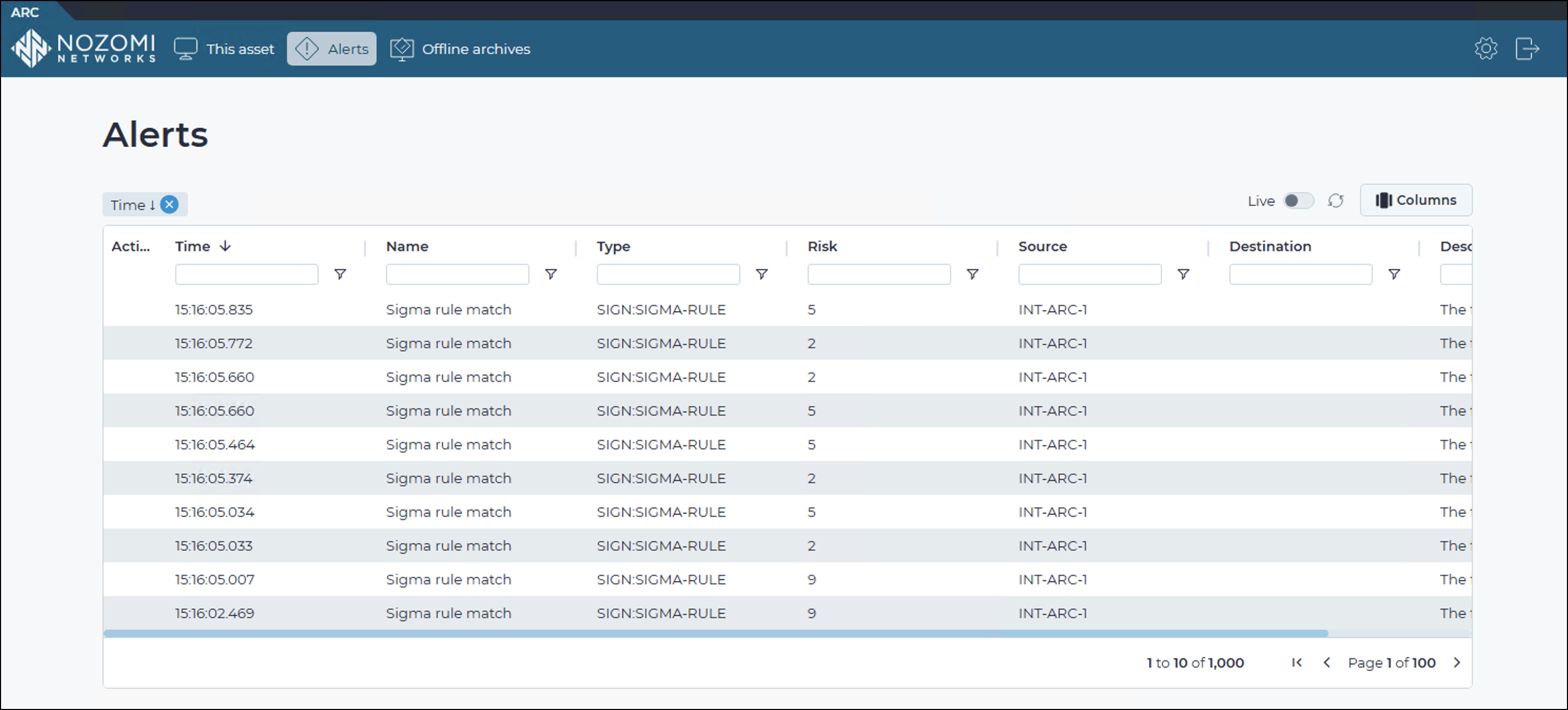
Live
The Live
 toggle lets you change live view on, or off. When live
mode is on, the page will refresh periodically.
toggle lets you change live view on, or off. When live
mode is on, the page will refresh periodically.
Refresh
The Refresh
 icon
lets you immediately refresh the current view.
icon
lets you immediately refresh the current view.
Columns
The Columns button lets you select which of the available columns for the current page will show.
Time
The date and time at which the alert was generated. By default, alerts are sorted by time, most recent first.
Name
The name of the alert.
Type
The type of alert.
Risk
The risk level associated with the alert.
Source
The label or internet protocol (IP) address of the source associated with the alert.
Destination
The label or IP address of the destination associated with the alert.
Description
A description of the alert.
Alert sources
The sensor generates alerts from the following detection sources:
- universal serial bus (USB) events: A USB device is plugged in or unplugged, draws unusual power, releases a scripted key, or transfers data
- Sigma rule matches
- Structured Threat Information Expression (STIX) indicator matches
- Windows Defender detections
- Malware rule matches