
Add a tiered zone configuration
Create a tiered zone configuration by assigning zones and subzones that inherit shared criteria such as network segments, MAC address fallback, and VLAN handling.
About this task
To create a zone configuration you need to:
- Define criteria that describe the objects that will be assigned to the zone.
These criteria include options such as:
- Network segment
- media access control (MAC) address fallback
- virtual local area network (VLAN) handling
- Specify the attributes that Vantage should apply to these assets and nodes
Procedure
-
In the top navigation bar, select
 The administration page opens.
 -
In the Organization settings section, select
Zone Configurations.
The Zone Configurations page opens.
- Select Tiered Zones.
-
Select Add.
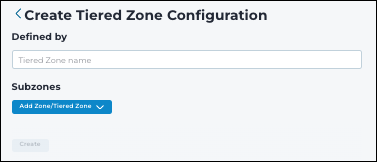
The Created Tiered Zone Configuration page shows.
-
In the Defined by field, enter a name for the tiered
zone.
-
Select Add Zone/Tiered Zone.
A dialog shows.
-
Choose one of these options:
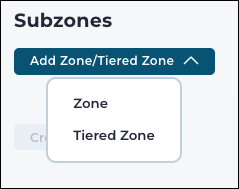
- Zone
- Tiered Zone
- Select one zone/tiered zone.
- Select Confirm.
- Select Create.