
Configure the IBM Maximo integration
This task gives the necessary steps to configure the IBM Maximo integration in your system. It helps you to select the necessary features, enter the required credentials, and apply the configuration to enhance asset enrichment.
Procedure
-
Go to
 > Integrations > Internal > IBM Maximo.
-
In the bottom right corner, select Configure.
The IBM Maximo integration settings page opens.
-
In the Description field, enter details that will help
you find the integration again.
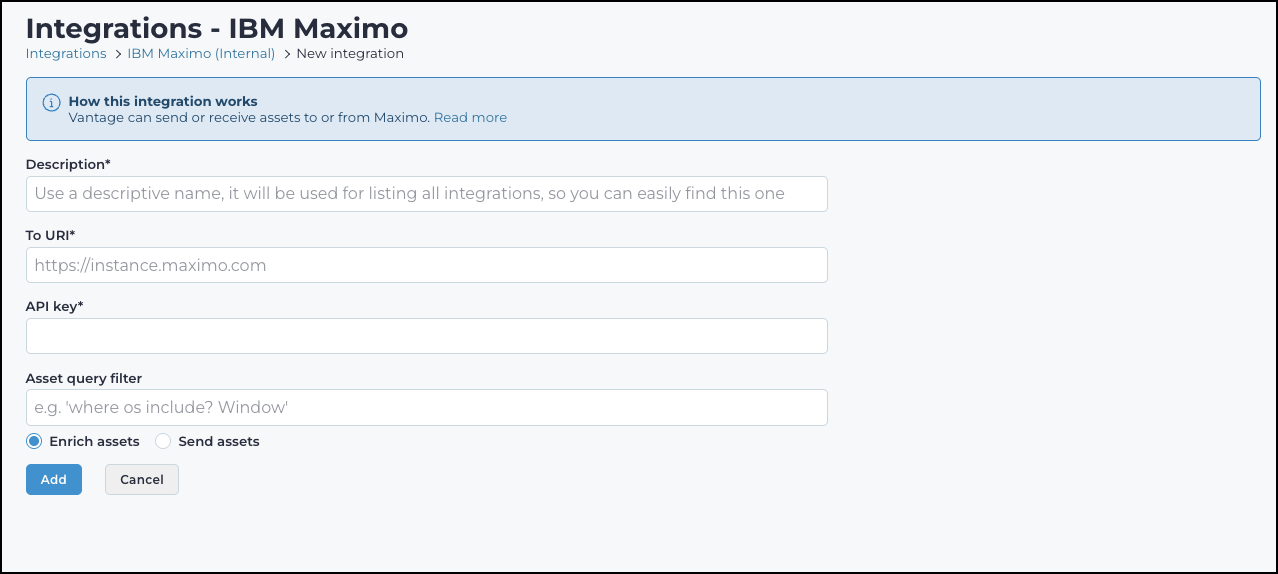
- In the To URI field, enter the host uniform resource identifier (URI) information.
- In the API key field, enter the application programming interface (API) key. This is a unique, secret key that is associated with a IBM Maximo dashboard account. It is used to authenticate and authorize access to the IBM Maximo dashboard API. This allows users, or systems, to programmatically interact with, and manage IBM Maximo devices and configurations.
-
Choose an option:
- Enrich assets
- Send assets
- To apply the configuration, select Add.