Map an OID to a node attribute
Map the value of an object identifier to a node attribute, so that Smart Polling uses the value it collects to update that attribute on the node.
About this task
When you create an simple network management protocol (SNMP) plan, you can map the value of an object identifier (OID) to a node attribute. You can map an OID to one or more of the following attributes:
- Firmware version
- Label
- Product name
- Serial number
- Vendor
- Any custom field with 'string' type
Procedure
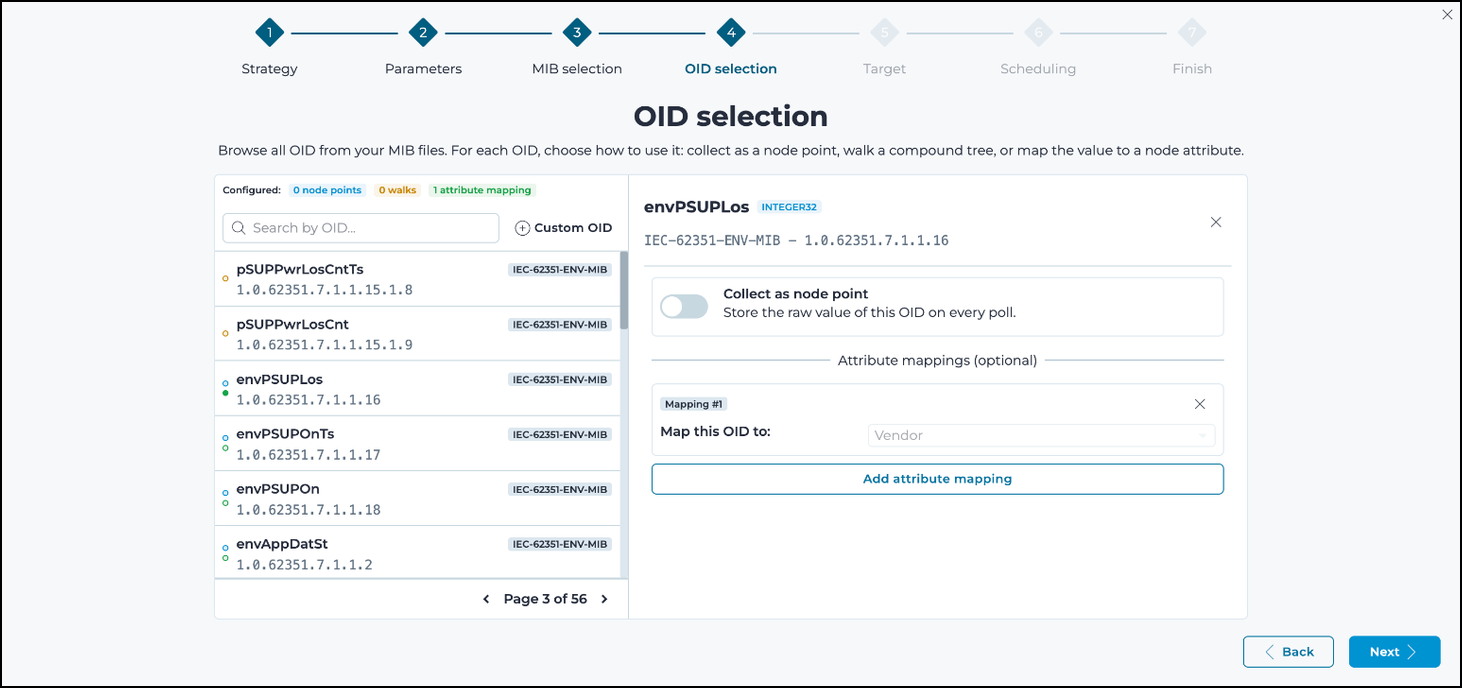
- In the plan creation wizard for an SNMP plan, go to the OID selection page.
-
Find the OID in the list.
Use the arrows below the list to go to other pages, or enter text in the Search by OID field. You can search by the number of the OID.
-
Select the OID.
The details of the OID show on the right.
-
Under Attribute mappings, select Add
attribute mapping.
The Mapping # box shows.
-
From the Map this OID to list, select the node
attribute.
Custom fields show in the list as Custom field: followed by the name of the field.If you added a mapping, but did not select a target attribute, the button to go to the next step is disabled.
- Optional: You can map a single OID to multiple attributes. To do so, select Add attribute mapping again, and repeat the previous step.
Results
The number of attribute mappings in the Configured summary at the top of the page increases, and the dot for the mapping is filled.